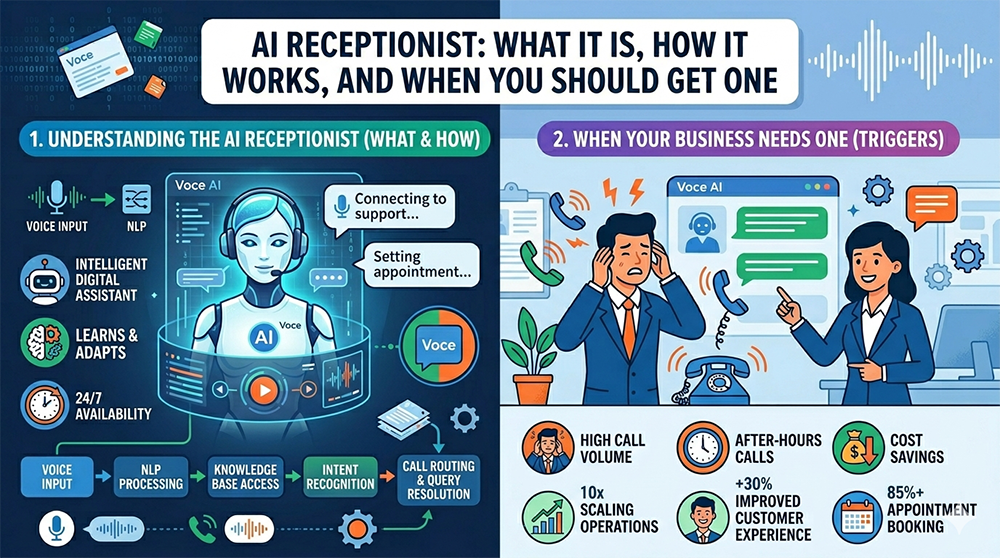
AI Receptionist: What It Is, How It Works & When to Get One
Walk into almost any small or mid-sized business today and watch the front desk during a busy hour. Phones ringing, callers on hold, the receptionist juggling three things at once — and somewhere in there, the call that actually would have become a customer goes to voicemail and never calls back. Industry research has put that lost-call rate at 30–60% of inbound business calls for years. It hasn't gotten better with WFH, with mobile-first customers, or with shrinking front-desk teams.
An AI receptionist is the most credible answer to that gap that telecom has produced in a decade. Here's what one actually is, what it can and can't do today, when it makes sense, and how to evaluate a provider.
What is an AI receptionist?
An AI receptionist is a software agent that answers inbound business calls, holds a natural conversation with the caller, and completes a defined set of front-desk tasks — taking messages, booking appointments, answering frequently asked questions, capturing intake details, and routing calls to the right person — without a human picking up.
Under the hood, modern AI receptionists combine real-time speech recognition, large-language-model understanding, and natural-sounding voice synthesis. The result is a conversation, not a menu — callers speak the way they'd speak to a person, and the agent responds, asks follow-ups, and acts.
How it's different from auto-attendants and IVRs
This is the question people ask first, and it's the right one. Older phone-tree systems get a bad reputation for a reason:
- Auto-attendants are scripted menu trees ("Press 1 for sales, press 2 for support…"). Rigid, slow, and the moment a caller's need doesn't fit a menu, the call falls apart.
- IVRs add some speech recognition and limited keypad input, but they still march callers through predetermined paths.
- AI receptionists let the caller explain what they need in their own words — "I'd like to reschedule my appointment for next Tuesday" — and the agent understands, checks the calendar, and offers options. No menus to memorize, no robotic prompts.
What an AI receptionist can do today
The honest list of capabilities you should expect from a serious AI voice agent in 2026:
- Answer every call on the first ring, 24/7, with no hold queue.
- Book, reschedule, or cancel appointments in real time against Google Calendar, Microsoft 365 / Outlook, Calendly, Acuity, or any scheduling tool with an open API.
- Capture intake — name, callback number, reason for the call, account details — and write it straight into HubSpot, Zoho CRM, Salesforce, ServiceTitan, or your ticketing system.
- Answer routine FAQs about hours, locations, services, pricing, and policies without escalating.
- Route the call intelligently to the right department or person — with the context the caller already provided preserved on transfer, so they don't repeat themselves.
- Place outbound calls for appointment reminders and confirmations, which measurably reduces no-shows.
- Run post-call surveys with natural conversation flow instead of "press 1 for satisfied."
- Cover after-hours volume — take messages, schedule callbacks, or escalate emergencies based on rules you define.
- Speak multiple languages in the same agent — useful for businesses with a multilingual customer base.
What it can't do (yet)
An AI receptionist is not a replacement for human judgment. It's a tool that extends your team. There are situations where you still want a person: emotionally charged calls, complex consultative selling, nuanced medical triage, or anything that benefits from human empathy. The right deployment makes the AI excellent at the routine, and uses clean human-handoff to make sure the hard calls reach the right person quickly.
How to know if your business is ready
You're probably a strong candidate if any of these sound familiar:
- You're missing calls regularly — after hours, during lunch, when the front desk is on another call, during volume spikes.
- Your receptionist or staff is spending a meaningful chunk of the day on routine intake and scheduling instead of higher-value work.
- You run an appointment-heavy operation — medical, dental, legal, salon, real estate, home services, automotive.
- You have multi-language demand and can't realistically staff for it.
- Your call volume is uneven — quiet mornings, frantic afternoons, after-hours overflow.
- You've been quoted on adding another receptionist and the math doesn't work.
How an AI receptionist actually gets deployed
It's not a wizard you click through in an afternoon. A real deployment has three stages:
- Design the agent. Together with your team, we define the intents the agent should handle, the workflows behind them, the FAQs it should know, the escalation rules, and the tone and persona it should use. This is the most important step — get it right and the rest is straightforward.
- Connect your systems. The agent is wired into the systems it needs to actually do its job — your calendar (Google, Microsoft 365), scheduling tool (Calendly, Acuity), CRM (HubSpot, Zoho, Salesforce, ServiceTitan), Slack or Microsoft Teams for live notifications, and webhooks or Zapier for everything else. This is what separates an AI receptionist from a glorified voicemail.
- Go live and tune. The agent starts taking calls. We monitor real conversations, tune intents, expand its FAQ knowledge, and refine handoff. The AI gets noticeably better in its first few weeks of real use.
That's the model behind Voce AI — IntelliVoice's AI voice agent platform — and it's the same shape any serious provider should follow.
Integrations you can plug in today
An AI receptionist is only as useful as what it can actually do in your stack. IntelliVoice can wire Voce AI into the tools your business already runs on:
- Calendars & scheduling — Google Calendar, Microsoft 365 / Outlook, Calendly, Acuity Scheduling. Check availability, book, reschedule, and cancel in real time.
- CRMs — HubSpot, Zoho CRM, Salesforce, and ServiceTitan. Capture intake straight into the right record with the call summary attached.
- Collaboration & notifications — Microsoft Teams, Slack, email, or SMS to your team the moment a call worth knowing about lands.
- Open bridges for everything else — Zapier, Make, and direct webhooks so Voce can hand off to any system that exposes an API.
If your business runs on something specific you don't see listed, ask — most modern platforms expose an API or a Zapier app we can wire in during the design phase.
Industries seeing the biggest ROI right now
Some industries are years ahead of the curve. If you're in one of these, the question is less "should we" and more "why haven't we."
- Healthcare and dental practices — appointment scheduling, intake, and after-hours coverage.
- Legal firms — qualified intake at the top of the funnel, conflict checks, scheduling consultations.
- Home services (HVAC, plumbing, electrical, pest control) — booking visits, dispatch, after-hours emergency triage.
- Real estate — listing inquiries, showing requests, agent routing.
- Hospitality — reservations, FAQ ("what time is check-in?"), wake-up calls, multilingual guest service.
- Veterinary practices — same shape as human healthcare, often with even thinner front-desk staffing.
What to look for when evaluating a provider
Not all AI voice agents are equal. A short checklist before you commit:
- Real integrations, not just message-taking. If the agent can't actually do things in your systems, you're paying for an expensive voicemail.
- HIPAA capability and BAA availability if you handle any protected health information.
- Clean human handoff with context preserved — no caller should ever repeat themselves on transfer.
- Voice quality. Listen to a live demo, not a marketing clip. Stilted voices erode trust within seconds.
- US-based deployment and support from people who actually understand your industry.
- A real design phase. Anyone selling "self-serve AI receptionist in 5 minutes" is selling a bot, not a receptionist.
The honest bottom line
AI receptionists are not a fad and not a replacement for your team. They're a way to make sure every call gets answered, every appointment gets booked, every after-hours customer gets a response — without burning out the people you do have. For the right business, the ROI math is straightforward: the cost of not doing this shows up every month in calls that went to voicemail and never came back.
If you're already on IntelliVoice business phone service, adding Voce AI is a clean extension of the same platform — same number, same network, just smarter answering. If you're on someone else, porting in is free and we can plug the agent in on top.
See Voce AI on your own phone number
The fastest way to know if an AI receptionist is right for you is to hear one answer your own calls. We'll set up a working demo on a number you choose.
Learn About Voce AI